
Adobe Firefly Review: AI Creative Suite for Images, Video, and Audio
TL;DR
Adobe Firefly pulls together text-to-image generation, text-to-video generation, audio creation tools, and multi-model access inside a single cloud-based platform. It's built for marketing teams, content creators, and agencies that need professional-quality assets at scale - without the usual chaos of juggling five different subscriptions. Plans start at $0 and climb to $199.99/month.
Adobe Firefly Overview
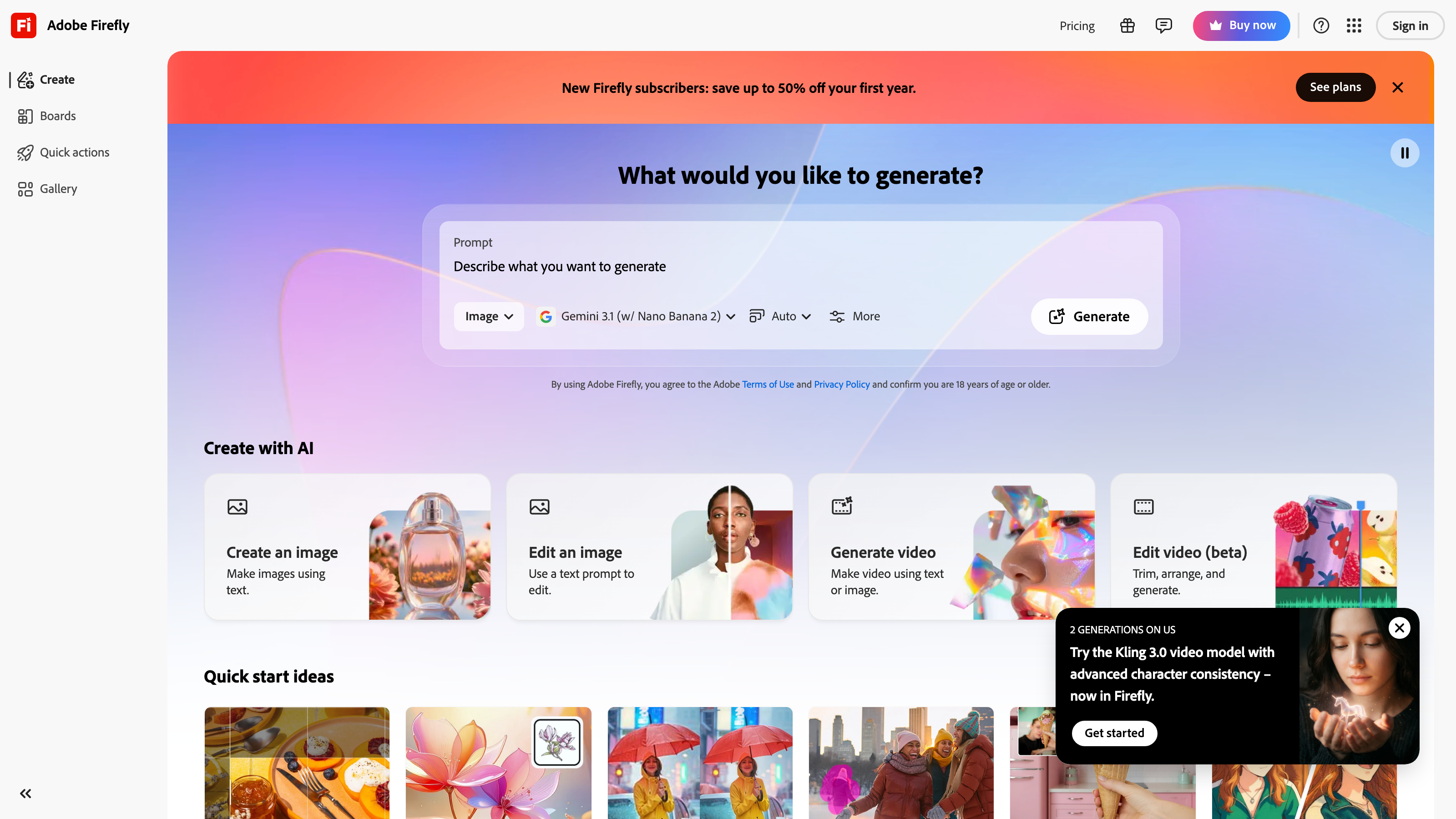
Adobe Firefly is Adobe's standalone AI creative platform, accessible at firefly.adobe.com. And honestly, it's solving a problem that's gotten pretty urgent for a lot of teams: the gap between how much content modern businesses need and how fast humans can actually produce it.
Think about it. Marketing teams need dozens of ad variations. E-commerce brands need hundreds of product images across different backgrounds and seasons. Video teams need localized cuts for multiple markets, often on tight deadlines. Firefly is Adobe's attempt to address all of those bottlenecks inside one subscription - and for the most part, it's a serious attempt.
Unlike Adobe's legacy desktop apps, Firefly is fully cloud-based. No software installation, no local rendering, no need for a beefy workstation to handle it. You generate, edit, and export directly from a browser, or from the Firefly mobile app if you're working on the go.
Here's what catches most people off guard: Firefly isn't just a text-to-image generator. It spans AI apps for images, video, and audio, making it one of the very few platforms that covers the full creative production stack in a single product. It also integrates directly into Adobe Creative Cloud apps like Photoshop and Premiere, so if your team already lives in those tools, adding generative AI to existing workflows isn't nearly as disruptive as it sounds.
One thing worth calling out early in this Adobe Firefly review - and it matters more than most reviews acknowledge - is the training data situation. Adobe built Firefly's models on licensed and public-domain content, which gives it a cleaner commercial-use story than quite a few competitors. Content Credentials, a metadata tagging system that marks AI-generated output, adds a layer of transparency that enterprise buyers and regulated industries increasingly require before they'll touch AI-generated assets.
Pricing and feature details in this review were verified from the official site in July 2026.
Key Features
Text-to-Image Generation
Firefly's text-to-image tool converts written prompts into photorealistic or stylized images. You can specify aspect ratios, color tones, lighting styles, and content types. The tool supports HD, 2K, and 4K output - which genuinely matters if you're producing print-ready or large-format advertising work. There's also an in-app editing layer so you can refine results without having to export everything into a separate tool and start the back-and-forth all over again.
Generative Fill
Out of everything Firefly offers, Generative Fill is probably the feature that clicks fastest for teams with existing creative workflows. It lets you remove objects, extend image backgrounds, or drop in new elements using a text prompt. The same capability is built directly into Photoshop, so if your team works in Creative Cloud, you're not switching tabs or apps to use it - it's just there.
For e-commerce and marketing teams, this is genuinely time-saving. Manual photo retouching for product images is one of those tasks that seems quick until it isn't. Being able to swap backgrounds or clean up images at scale without a dedicated retoucher is a real operational win.
Text-to-Video Generation and Generate Video
Firefly's text-to-video tool - branded as Generate Video inside the platform - produces short video clips from text prompts. The Pro tier gives you up to 40 five-second video clips per month, and the Premium tier unlocks unlimited Firefly Video Model generations. Based on published sample outputs from Adobe's gallery, the video quality and motion coherence at short durations hold up well against other generative AI video tools at this price point.
That said, five seconds is five seconds. More on that in the cons section.
Firefly AI Assistant
The Firefly AI Assistant helps you refine prompts, explore creative directions, and find your way around the platform's various tools. It's less of a standalone chatbot and more of an interactive layer that sits on top of the generation tools. For teams without a dedicated prompt engineer on staff - which is most teams - it meaningfully cuts down on the trial-and-error that usually eats up the first hour of working with any new generative AI system.
Music and Soundtrack Generation, Text-to-Speech, and Sound Effects
This is where Firefly separates itself from a lot of competitors. Audio production is covered across three distinct use cases:
- Music and soundtrack generation creates background music for video content.
- Text-to-speech converts written scripts into spoken audio - useful for AI-generated training materials, explainer videos, and business presentations.
- Sound-effects generation produces short audio clips from text descriptions.
Combined, these tools mean video creators can produce complete audiovisual content inside one platform without purchasing separate audio software. That's not nothing - audio licensing alone can get expensive fast.
Audio/Video Translation and Subtitle Generation
Firefly includes multilingual support through its audio/video translation feature, which can translate content up to 13 minutes in length on the Pro tier. Paired with subtitle generation, it's genuinely practical for corporate communications teams that need to localize content across multiple regions. The 13-minute cap is a real constraint, though - if you're working with longer presentations or recorded town halls, you'll need to factor that ceiling into your tier decision before committing.
Firefly Boards
Firefly Boards is a collaborative moodboarding and concept workspace designed to support brand consistency and visual style across campaigns. Teams can collect reference images, generated assets, and notes in one shared space before moving into final production. For larger content operations where creative drift is a real problem - where assets from week three start looking nothing like assets from week one - Boards gives you a visual anchor to keep things coherent.
Multi-Model Access and Content Credentials
Firefly gives users access to models from multiple providers, including Adobe's own models alongside third-party options like Google's models and Luma Ray3. Multi-model access at this price point is genuinely uncommon, and it gives you more stylistic range than single-model platforms can offer. Content Credentials automatically tag AI-generated output with metadata, which helps with attribution and compliance in regulated or brand-sensitive environments - the kind of thing legal and procurement teams ask about.
Adobe Firefly Pricing
Firefly runs on a credit-based subscription model. Credits are consumed per generation, with different tools costing different amounts per use. Here's what Adobe currently publishes:
- Free - $0/month: Free daily generations across image, video, and audio tools. Access to popular models including Nano Banana and Luma Ray3. Credits refresh daily rather than monthly. This tier is fine for personal experimentation or evaluating the platform before spending anything - but daily caps make it impractical for any kind of professional output volume.
- Firefly Standard - $9.99/month: 2,000 generative credits per month, plus unlimited standard image features including Generative Fill. Includes access to leading models from Adobe, Google, and others.
- Firefly Pro - $19.99/month: 4,000 credits per month, up to 40 five-second videos, and audio/video translation for content up to 13 minutes per month.
- Firefly Pro Plus - $49.99/month (limited-time first-year price of $34.97/month, offer ends August 26): 10,000 credits per month and up to 100 five-second videos.
- Firefly Premium - $199.99/month (limited-time first-year price of $139.91/month, offer ends August 26): 50,000 credits per month and unlimited Firefly Video Model access through Generate Video.
- Creative Cloud Pro bundle for individuals - $69.99/month (annual plan, billed monthly): Introductory price of $34.99/month for the first three months for new subscribers. Includes 20-plus Creative Cloud apps including Photoshop, Illustrator, and Premiere, with Firefly AI baked in. If your team needs both traditional Adobe tools and Firefly AI capabilities, this is almost certainly the most cost-efficient entry point.
Enterprise and custom pricing exists but isn't published on the homepage. If you're evaluating Firefly for organization-wide deployment, you'll need to contact Adobe directly to get numbers that actually apply to your situation.
Who Adobe Firefly Is Best For
Marketing teams and agencies: Teams running paid social, video advertising, and display campaigns are probably the clearest fit here. Being able to generate product images, produce short video ads, add voiceovers, and localize content inside one platform reduces the number of vendor relationships you're managing - and that adds up. Multi-model access and batch-friendly generation tools hold up well for high-volume creative output. [INTERNAL_LINK: ai-tools-for-marketing-teams]
E-commerce brands: Product photography is expensive and slow to schedule. Generative Fill and text-to-image generation give e-commerce teams a way to create background variations, lifestyle images, and seasonal creative without organizing new photo shoots every time something changes. Content Credentials also provide the attribution metadata that larger retailers are increasingly requiring from AI-generated assets before they'll publish them.
Content creators and video creators: The combination of text-to-video generation, text-to-speech, music and soundtrack generation, and subtitle generation means individual creators can put together complete short-form video content without a full production team behind them. The free tier lets you get a real feel for the platform before you commit to anything paid.
Corporate communications teams: The multilingual features - audio/video translation and subtitle generation - suit companies producing internal training videos, executive communications, or product demos for multiple regional audiences. It's one of those quiet use cases that doesn't get much press but genuinely saves communications teams a lot of coordination overhead.
Educators producing AI-generated training materials: Firefly's text-to-speech and audio tools support fast production of narrated training content. The cloud-based delivery model means no IT infrastructure setup, which matters in larger organizations where spinning up new tools can take longer than the project itself.
Not the right fit - solo creators on tight budgets: Let's be direct here. Firefly's free tier is limited by daily credit refreshes rather than a fixed monthly bank, which makes it genuinely hard to build any kind of consistent workflow around. For solo creators who need predictable volume on a small budget, tools like Canva's AI image features or Kling AI for video may just serve you better at the entry level. Firefly's strength is breadth across image, video, and audio - but you don't really get access to that full breadth until the $19.99/month Pro tier or higher. [INTERNAL_LINK: canva-ai-review]
Adobe Firefly Review: Pros and Cons
Pros
- Full creative stack in one platform. Image, video, and audio generation under one subscription is genuinely rare. It cuts down on tool sprawl for teams juggling multiple creative output types at once.
- Commercial-use clarity. Adobe's training data practices and Content Credentials tagging give Firefly a stronger commercial-use story than most generative AI competitors. For agencies and brands that need clean IP documentation, this is worth real money.
- Multi-model access at mid-range prices. Access to third-party models including Google and Luma Ray3 alongside Adobe's own models gives you more stylistic range without paying for separate subscriptions.
- Deep Creative Cloud integration. If your team already works in Photoshop, Premiere, or Illustrator, Generative Fill and other Firefly features are embedded directly into the tools you're already using.
- Firefly Boards supports brand consistency and style. Teams can build visual references and carry them across campaigns, which genuinely reduces creative drift in large content operations.
Cons
- Video generation is capped at five seconds per clip. Even at the Pro Plus tier, individual video clips top out at five seconds. Longer video content means stitching clips together, which adds post-production time and can create noticeable visual inconsistencies between segments.
- The credit system is opaque in practice. Adobe publishes credit totals per tier but doesn't prominently display how many credits each specific action consumes. Users on mid-tier plans can burn through credits faster than expected depending on which tools they lean on most.
- Audio/video translation is capped at 13 minutes on the Pro tier. For communications teams working with longer presentations or recorded town halls, 13 minutes is a hard stop that forces an upgrade to higher-tier plans.
- The free tier isn't suitable for consistent professional use. Daily refresh limits rather than a monthly credit bank make the free tier unpredictable for anyone trying to use Firefly as part of a regular production workflow.
- No publicly listed API access. Teams wanting to integrate Firefly's generation capabilities into custom applications or automated pipelines will need to negotiate enterprise arrangements. There's no self-serve API tier on the public pricing page.
Alternatives to Adobe Firefly
Midjourney: For pure text-to-image quality, Midjourney is still a strong competitor - particularly for concept art and stylized illustration work. It doesn't include video or audio generation, so it serves a narrower use case. If your team is focused almost exclusively on image output, its image quality at comparable prices may honestly impress you more than Firefly's. [INTERNAL_LINK: midjourney-review]
Runway: Runway is a focused AI video production platform. Its video generation quality is competitive with Firefly's Generate Video feature, and it includes a wider set of video-specific editing tools. Audio generation and image creation aren't its strengths, but for editing and post-production workflows built around video, it's worth evaluating alongside Firefly before you decide. [INTERNAL_LINK: runway-ai-review]
Canva AI: Canva includes AI image generation, background removal, and basic video tools within its design platform. It suits startups and small businesses that need templates-first design rather than generation-first creative production. It's missing Firefly's video generation depth and audio suite, but its pricing entry point is lower for teams that primarily need branded design assets. [INTERNAL_LINK: canva-ai-review]
Frequently Asked Questions About Adobe Firefly
Does Adobe Firefly include commercial use rights for generated content?
Adobe states that Firefly is designed for safe commercial use, with training data sourced from licensed and public-domain content. Content Credentials metadata is automatically attached to AI-generated outputs. That said, you should review Adobe's current terms of service directly - commercial use policies can change, and they may vary depending on which model you select within the multi-model options.
Can Firefly be used without a Creative Cloud subscription?
Yes. Firefly is available as a standalone product at firefly.adobe.com with its own pricing tiers starting at $0. A Creative Cloud subscription isn't required. However, the Creative Cloud Pro bundle at $69.99/month (or $34.99/month for new subscribers in the first three months) includes both Firefly AI and 20-plus Creative Cloud apps, which makes it a significantly better value for teams that need both sides of the equation.
What is the difference between generative credits and unlimited features?
Some features - like Generative Fill on the Standard tier - are listed as unlimited and don't consume credits. Other features, particularly video and audio generation, draw from your monthly credit bank. Adobe doesn't prominently display the exact credit cost per action on the pricing page, so it's worth reviewing Adobe's credit consumption guide before you commit to a tier. Finding out mid-month that video generation costs more than you expected isn't a fun surprise.
Is Adobe Firefly available on mobile?
Yes. Adobe offers a Firefly mobile app alongside the cloud-based browser interface. Mobile access works well for generating and reviewing assets on the go, though complex editing workflows are genuinely better suited to the desktop browser experience.
What happens to unused Firefly credits at the end of the month?
Based on the published pricing structure, credits are allocated monthly and refresh each billing cycle. Adobe doesn't publicly indicate that unused credits roll over. If your team has variable monthly workloads - busy season followed by a quiet month - that's worth factoring into your tier decision, since credits you don't use don't carry forward.
How does Adobe Firefly compare to other generative AI platforms?
Firefly's main advantage over single-purpose tools is breadth. Most generative AI platforms specialize in either images, video, or audio. Firefly covers all three under one subscription, which simplifies the workflow complexity of managing multiple vendor tools. The trade-off is that specialized tools like Midjourney for images or Runway for video may offer deeper feature sets within their individual categories - so if you only need one thing, a focused tool might serve you better.
Does Adobe Firefly support enterprise or custom deployments?
Enterprise and custom pricing is available but not listed publicly on Adobe's homepage. Organizations with large-scale needs - including API access for automation and workflow integration - should contact Adobe's enterprise sales team directly. The publicly listed plans are designed for individual users and small to mid-size teams.
Adobe Firefly Review: Final Verdict
Adobe Firefly is the most comprehensive single-subscription AI creative platform currently available for marketing and content production teams. The combination of text-to-image generation, text-to-video generation, audio tools, multilingual support, and brand consistency features inside one cloud-based platform is genuinely hard to replicate without pulling together three or four separate subscriptions and figuring out how to make them talk to each other.
The clearest buyer for Firefly is a marketing team, agency, or e-commerce brand producing high volumes of image, video, and audio content across multiple channels - and one that needs clean commercial-use documentation for AI-generated assets. For those teams, the Creative Cloud Pro bundle at $69.99/month is the most efficient entry point if you're also using traditional Adobe tools.
The honest caveat is this: the credit system can bite you if you don't understand it going in. Solo creators or very small teams with limited monthly output may find themselves constrained more than expected, and the free tier's daily refresh model isn't a reliable foundation for any real production workflow. If that sounds like your situation, spend some time with Midjourney or Canva AI first before committing to Firefly's mid-tier pricing - it's a reasonable step before going all in. [INTERNAL_LINK: best-ai-creative-tools]
The facts.
Pulled from Adobe Firefly’s own pages and dated so you can see how current each one is. Anything we could not confirm is left out rather than guessed.
- Free tier
- Yes checked Oct 2026
- Starting price / month
- $9.99/mo checked Oct 2026
- Cheapest paid tier
- $9.99/mo checked Oct 2026
- Pricing model
- Flat checked Oct 2026
Adobe Firefly pricing.
Pricing extracted from Adobe Firefly's site. Confirm before buying.
AI-generated analysis; edited and accountable: Tom Young. Data is verified from vendor sites on a dated schedule, not hands-on trials.
This vendor's site blocks automated reading, so the pricing and feature data here was entered by our editor from the vendor's public pricing page (Manually verified from adobe.com/products/firefly/plans.html and adobe.com/creativecloud/plans.html (Creative Cloud Pro bundle includes Firefly). Read in-browser 2026-07-09. Monthly prices shown; promo/annual noted in tier features.).
- Verified
- July 2026
- Pipeline
- 2026.07.04-1
- Checks run (6)
- author, editor, quality_review, seo, factcheck, humanize
- SEO score
- 82
- Evidence sources (1)
- firefly.adobe.com