TubeMagic
We may earn a commission if you sign up through our link · Affiliate disclosure
Facts verified:
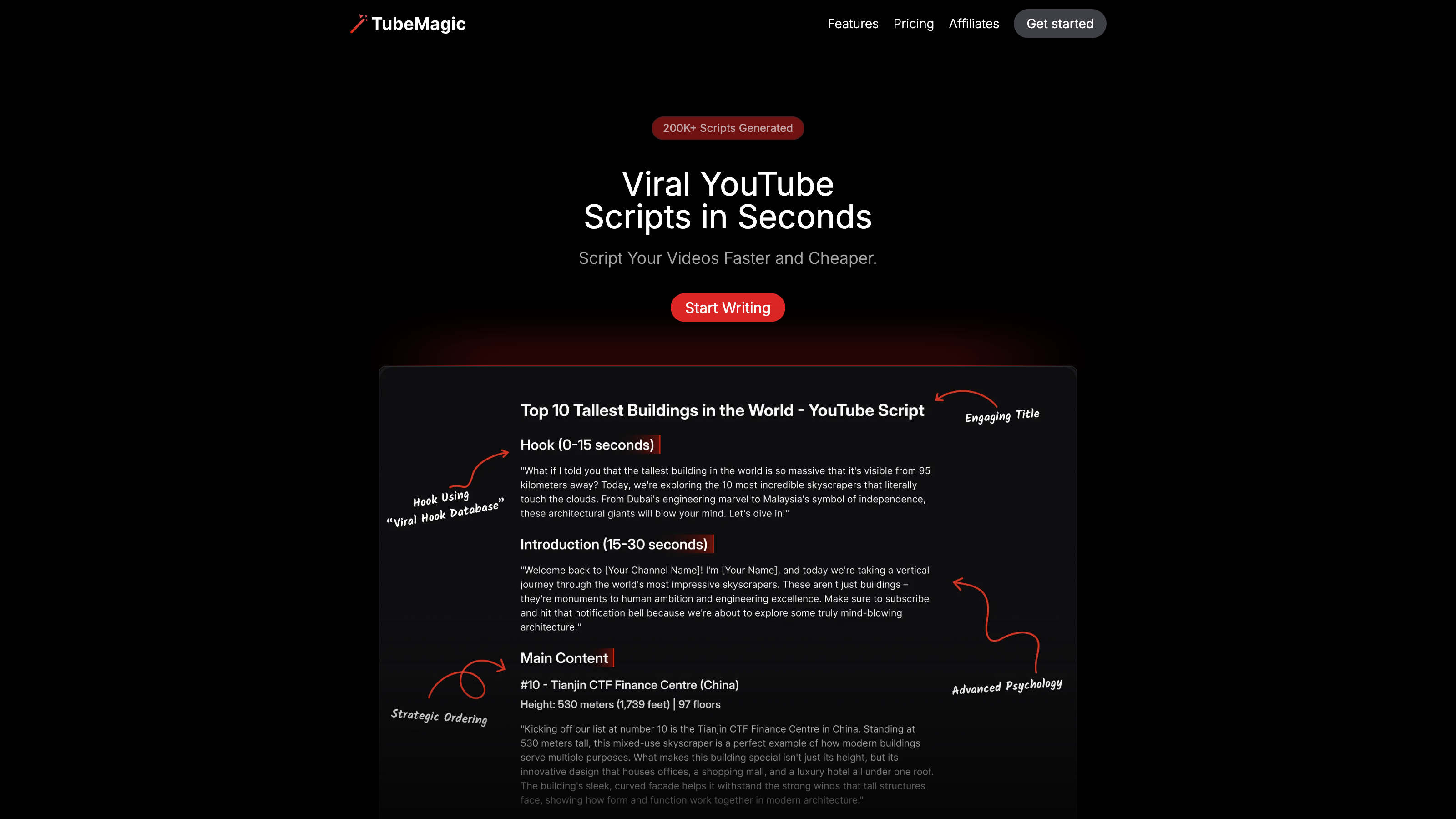
TubeMagic Review: An Honest Look at This AI YouTube Content Platform
TL;DR
This TubeMagic review covers an AI-powered platform built to help YouTube creators and marketing teams produce scripts, titles, tags, and thumbnails faster. TubeMagic targets content creators, agencies, and marketers who want to scale their YouTube output without sacrificing content quality. The single Premium plan costs $41/month billed yearly ($497/year) and unlocks every tool in the suite. Pricing and feature details were verified from the official site in July 2026.
Overview
YouTube content production is a grind. A single video requires idea research, script writing, SEO optimization, and thumbnail creation - often spread across multiple separate tools and several hours of work. TubeMagic is designed to collapse that workflow into one platform.
The tool positions itself as an end-to-end YouTube content assistant. Rather than replacing a creator's voice, it aims to accelerate the repetitive parts of production: finding viable topics, drafting scripts structured for retention, generating SEO-friendly metadata, and producing thumbnail concepts. It pulls from patterns found in high-performing YouTube content to inform its outputs. It also supports multiple AI models including GPT-4o, Claude 3.5, and Gemini, giving users control over generation style and quality.
TubeMagic operates as a cloud-based web platform with a Chrome extension available for browser-level workflow integration. A mobile app is also listed among supported platforms, which matters for creators who manage content away from a desktop.
The platform serves a broad range of use cases: organic growth, paid advertising, scriptwriting and storyboarding, SEO, and influencer and UGC production, among others. It covers YouTube Videos, YouTube Shorts, YouTube Ads, and YouTube Live content types, making it relevant across multiple publishing formats.
Pricing and feature details in this review were verified from the official site in July 2026.
Key Features
AI YouTube Script Writer
The Script Writer is the central tool. Users input a topic, a reference video for inspiration, or a custom brief, and the AI generates a full script including hooks and main content segments. The Inspiration-Based Writing feature lets users point TubeMagic at existing high-performing videos to match their structure. Channel Writing Style Matching goes further - it attempts to adapt output to match the tone and style of a specific channel. Scripts are fully editable after generation, so creators are not locked into raw AI output.
Multiple AI Models
TubeMagic connects to several large language models. GPT-4o, Claude 3.5, and Gemini are all listed. This is a practical advantage because different models have different strengths. Being able to switch between them gives users flexibility depending on the type of content being produced. This multi-model access is less common among single-LLM competitors in the YouTube content category.
Video Idea and Research Tools
Three tools work together here. The Video Idea Generator surfaces content ideas based on a niche or keyword. The Niche Explorer helps users identify content opportunities in a given topic area. The Top Video Finder analyzes what is already performing well on YouTube. An Ideas Manager ties these together as a simple workspace for organizing and acting on research. This cluster supports brainstorming and ideation workflows before a single word of script is written.
SEO and Metadata Tools
TubeMagic includes a Title Generator, Description Generator, and Tag Generator and Organizer. These outputs are built for YouTube SEO, helping videos get discovered through search and suggested content. A Plagiarism Checker is also included. That addition is practical because AI outputs can occasionally mirror source material too closely. These tools reduce the manual work of metadata optimization across a channel's publishing schedule.
AI Thumbnail Generator
Thumbnails are a major click-through rate driver on YouTube. TubeMagic includes an AI Thumbnail Generator that produces thumbnail concepts directly inside the platform. This reduces the need for a separate design tool for creators who want AI-generated thumbnail options rather than custom-designed ones. Note that output quality is unverified beyond what vendor data states - see the Cons section for detail.
Video to Script and YouTube to Transcript
The Video to Script feature converts existing video content into a reusable script format. The YouTube to Transcript tool pulls a text transcript from any YouTube video. Both tools support content repurposing - turning an older video into a refreshed script, or pulling structure and quotes from competitor content for research purposes.
Warp Upload Optimizer and Chrome Extension
The Warp Upload Optimizer is listed as a tool to streamline the upload process. The Chrome Extension integrates TubeMagic into the browser workflow, allowing users to access features while working directly on YouTube rather than switching tabs. This kind of workflow automation reduces friction in the production cycle.
Multi-Language Support and Channel Name Generator
Multi-Language Support expands the platform's reach beyond English-speaking creators, though the specific languages supported are not detailed in the verified product data. A Channel Name Generator rounds out the suite with a tool for creators in the early stages of channel setup. Templates and presets are available to help standardize output across a channel or team.
TubeMagic: Pricing
TubeMagic uses a single-tier subscription model. There is one plan:
- Premium: $41/month (billed yearly at $497/year)
- All tools unlocked
- Up to 100 generations per day per tool
- 500 premium credits per month
A Free Trial is listed as available, which allows users to evaluate the platform before committing to the yearly subscription.
There is no publicly listed month-to-month billing option, and no lower-tier or free-forever plan is mentioned in the verified product data. The 500 premium credits per month likely govern usage of higher-cost AI models such as GPT-4o or Claude 3.5, though the exact credit consumption per generation is not detailed in the verified data.
The all-in-one pricing is straightforward - one price unlocks everything. However, the $497 yearly commitment is a meaningful upfront cost for solo creators just starting out, especially with no confirmed monthly payment alternative.
Who It's Best For
Content Creators scaling output - Solo YouTubers who publish consistently and need to speed up scripting, SEO work, and ideation without hiring a team. The 100 generations per day per tool limit gives heavy users significant room to work.
Marketing Teams running YouTube ad campaigns - Teams producing YouTube Ads at volume can use TubeMagic to generate multiple script angles, titles, and descriptions in a single session. Multi-model support helps with tone variation across campaigns.
Agencies managing multiple YouTube channels - The Channel Writing Style Matching feature is particularly useful here. Agencies handling several client channels need output that feels native to each channel's voice, and this feature is designed specifically for that scenario.
Influencers and UGC creators - Creators who need a consistent publishing cadence can use the Ideas Manager and script tools to stay ahead of their content calendar without dedicated research staff.
Startups and small business owners new to YouTube - The Channel Name Generator, Niche Explorer, and full metadata suite give a new YouTube presence a structured starting point for both content strategy and SEO.
Not the right fit: professional video production studios and editors. TubeMagic's tools are built around scripting, metadata, and ideation - not technical post-production. Studios that need AI-assisted video editing, color grading, or timeline tools should look at dedicated video editing platforms instead. TubeMagic does not replace tools designed for post-production workflows.
Alternatives
VidIQ - A well-established YouTube growth tool focused on keyword research, competitor analytics, and channel auditing. It offers stronger analytics depth than TubeMagic but does not include AI script writing at the same level. A strong option for creators who prioritize data analysis over content generation.
TubeBuddy - A browser-based extension and web platform built for YouTube SEO, A/B testing on titles and thumbnails, and tag management. It overlaps with TubeMagic's metadata tools but focuses more on optimizing existing content than on generating new content from scratch.
Jasper - A general-purpose AI writing platform that can produce YouTube scripts and video descriptions. It offers broader content type coverage across blogs, ads, and emails, but lacks YouTube-specific tools like the Niche Explorer, Top Video Finder, or Channel Writing Style Matching.
FAQ
Does TubeMagic offer a free plan? TubeMagic offers a Free Trial, but no permanent free-forever plan is listed in the verified product data. The Free Trial gives users access to evaluate the platform before committing to the Premium subscription at $41/month billed yearly ($497/year total).
What AI models does TubeMagic use? TubeMagic supports multiple large language models including GPT-4o, Claude 3.5, and Gemini. Users can choose between these models depending on the task. The 500 premium credits included per month likely govern how much usage of the more resource-intensive models is covered under the plan.
Is TubeMagic useful for YouTube Shorts? Yes. The verified product data confirms TubeMagic covers YouTube Shorts alongside YouTube Videos, YouTube Ads, and YouTube Live. The Custom Video Length feature and script generation tools appear designed to accommodate shorter formats as well as long-form content.
Can TubeMagic match my existing channel's writing style? Channel Writing Style Matching is a listed feature in the verified product data. It is designed to adapt script output to match a specific channel's tone and style. The quality of this match will depend on the input provided and the complexity of the channel's voice.
Is there a Chrome extension included? Yes. TubeMagic includes a Chrome Extension as part of the platform. This allows users to access TubeMagic features within their browser while working on YouTube directly, rather than switching between separate windows or tabs.
TubeMagic: Final Verdict
TubeMagic is a focused, YouTube-specific AI content platform that brings together scripting, SEO metadata, ideation, and thumbnail generation under one subscription. For content creators and marketing teams who publish YouTube content regularly, the breadth of tools - particularly the multiple AI models, Channel Writing Style Matching, and the research cluster of Niche Explorer and Top Video Finder - represents genuine time savings over managing multiple separate tools.
This TubeMagic review finds the platform best suited to mid-volume to high-volume YouTube creators, marketing teams running YouTube ad campaigns, and agencies managing several client channels. The all-in-one toolset is its clearest strength.
The main caveat is cost structure. At $497/year with no confirmed month-to-month option and no permanent free tier, it is a real financial commitment. Hobbyist creators or those with a small, irregular publishing schedule may not generate enough output to justify the yearly spend. For anyone considering this tool, using the Free Trial to test script quality, thumbnail output, and credit consumption before purchasing is the logical first step.
The facts.
Pulled from TubeMagic’s own pages and dated so you can see how current each one is. Anything we could not confirm is left out rather than guessed.
- Starting price / month
- $41/mo checked Oct 2026
- Cheapest paid tier
- $41/mo checked Oct 2026
- Pricing model
- Flat checked Oct 2026
- Platforms
- web, plugin checked Oct 2026
TubeMagic pricing.
Pricing extracted from TubeMagic's site. Confirm before buying.
Pros & cons.
We don’t publish star ratings we can’t defend. These come from running TubeMagic on live briefs.
AI-generated analysis; edited and accountable: Tom Young. Data is verified from vendor sites on a dated schedule, not hands-on trials.
- Verified
- July 2026
- Pipeline
- 2026.07.04-1
- Checks run (2)
- author, quality_review
- SEO score
- 68
- Evidence sources (1)
- tubemagic.com