
Descript
Descript is an all-in-one video and audio editor that lets you edit media by editing text. Record, transcribe, and edit videos with AI-powered tools including Underlord (AI co-editor), Studio Sound, Eye Contact, Green Screen, and more. Features text-based editing, automatic transcription, and professional publishing capabilities.
We may earn a commission if you sign up through our link · Affiliate disclosure
Facts verified:
Descript Review: AI Video and Podcast Editor That Edits Like a Word Processor
TL;DR
This Descript review covers an AI-powered video and podcast editor built around one core idea: editing media should feel as simple as editing text. Descript automatically transcribes recordings and lets users cut, rearrange, or rewrite content by working with words instead of waveforms, with paid plans starting at $16/month (billed annually) as of July 2026. It targets podcasters, video creators, marketing teams, and educators who need fast, consistent output without deep technical editing skills.
Overview
Descript sits in a specific position in the creative software market. It is not trying to be the most powerful video editor available. It is trying to be the most approachable one - specifically for people who work with spoken-word content.
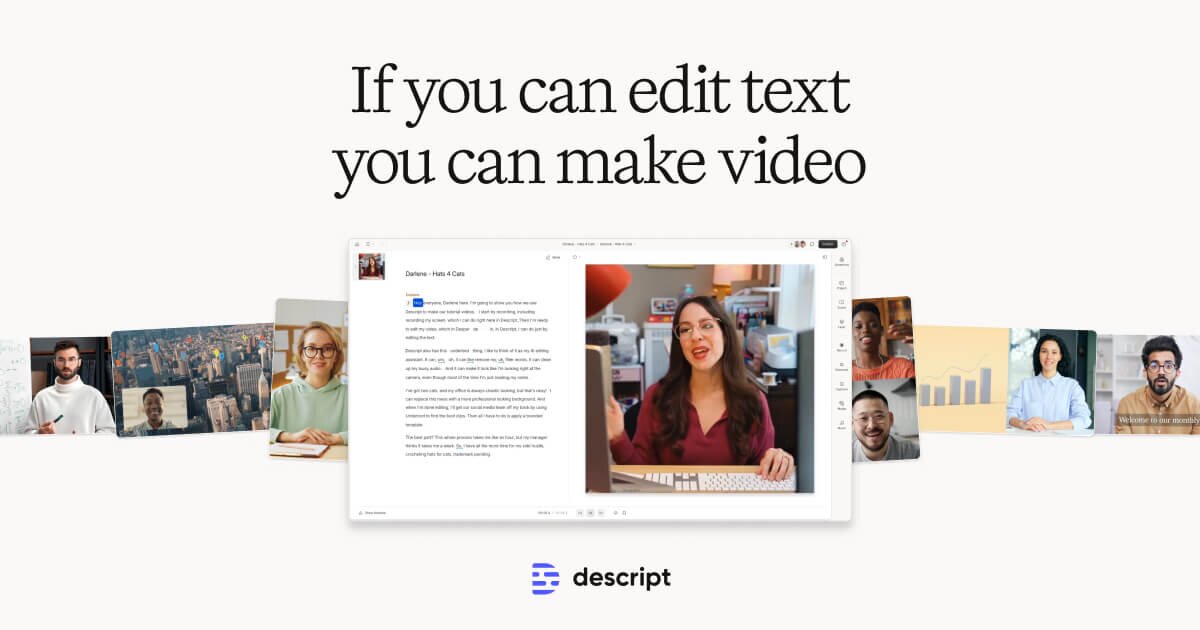
The core mechanic is text-based editing. Record or import your audio or video, and Descript generates a transcript automatically. That transcript is your editing surface. Highlight a sentence and delete it, and the corresponding media disappears. Rearrange paragraphs, and the audio or video follows. For anyone who has spent an hour scrubbing a waveform to find one stumbled word, that workflow changes where the time goes.
Beyond the transcript editor, Descript bundles in screen recording, AI voice tools including Voice Cloning, Subtitle Generation, and a royalty-free stock media library. The platform runs as both desktop software and a cloud/web-based application, so teams can collaborate without everyone needing the same machine setup.
Descript connects to major platforms including YouTube, Spotify, Zoom, Microsoft Teams, Facebook, and Facebook Ads - covering the most common destinations for podcast and video content.
Descript covers a wide range of use cases: Podcasts, Video and Film, Corporate Communications, Education and Training, Marketing and Advertising, and Paid Advertising. That breadth reflects how the tool is positioned as a general-purpose spoken-content production environment rather than a specialist tool for one vertical.
Pricing and feature details in this review were verified from the official site in July 2026.
Key Features
Text-Based Editing with Underlord AI
The headline feature is the transcript-driven editor, powered by Descript's AI layer called Underlord. Transcription happens automatically on import or after recording. From there, editing works at the text level rather than the timeline level. This makes Descript a strong example of AI Apps for Text applied to media production - you are working with language, not keyframes.
Underlord also handles tasks like removing filler words in bulk, generating chapter markers, and writing show notes or summaries from your transcript. These are Automation and Workflow features that compress the post-production process for regular publishers.
Voice Cloning
Voice Cloning lets users create a synthetic version of their own voice. The practical use case: if you record a podcast episode and later realize you need to fix a line or add a sentence you forgot, you can type the new text and Descript generates audio in your voice to fill the gap. This avoids re-recording sessions and keeps the audio consistent. It is one of the more distinctive features in this Descript review, and it reflects the platform's broader investment in Generative AI.
Translation and Dubbing
Descript includes Translation and Dubbing as a key feature. This means you can take an English-language video and generate a dubbed version in another language using AI-generated voice. For marketing teams or educators distributing content to international audiences, this removes what would otherwise be a significant production cost. The accuracy and naturalness of the output will vary by language pair, but the feature is built into the platform rather than requiring a third-party integration.
Brand Studio
Brand Studio is available to Business plan subscribers and gives teams control over visual consistency across content - fonts, colors, logos, and templates. This connects to the Collaboration and Sharing capabilities that matter most to marketing teams producing content at volume. Business plan subscribers get team-wide access to Brand Studio, making it a shared resource rather than a per-user setting.
Screen Recording
Built-in Screen Recording means users can capture their screen directly inside Descript without switching to a separate tool. The recording feeds into the same transcript-based workflow, so editing the captured content follows the same process as editing any other video. This is particularly useful for corporate communications teams producing software tutorials or training videos.
Royalty-Free Stock Media Library
Descript includes a Royalty-Free Stock Media Library for adding B-roll, background music, or other media assets without leaving the application. This keeps the production workflow contained inside one tool rather than requiring subscriptions to separate stock media services.
Subtitle Generation
Subtitle Generation is built in, producing captions from the transcript automatically. For video creators publishing to YouTube or social platforms, this reduces one more manual step in the publishing workflow. Captions also improve accessibility and tend to improve watch time on platforms where video autoplays without sound.
Collaboration and Sharing
Descript supports Collaboration and Sharing across the platform, with team features scaling up through the Business and Enterprise tiers. Multiple people can work in the same project, which makes it practical for production teams rather than just solo creators.
Descript: Pricing
Descript uses a freemium model with four published tiers and a custom Enterprise option.
Free - $0/month: Covers text-based editing and access to AI tools for basic exploration. Export quality and AI credit access are restricted compared to paid tiers.
Hobbyist - $16/month (annual) or $24/month (monthly): Includes 10 media hours per month, 400 AI credits per month, 1080p export, and no watermark on exports. This is the entry point for anyone publishing regularly.
Creator - $24/month (annual) or $35/month (monthly): Steps up to 30 media hours per month, 800 AI credits per month, 4K export, and watermark-free output. Aimed at higher-volume content creators who need better export quality.
Business - $50/month (annual) or $65/month (monthly): 40 media hours per month, 1,500 AI credits per month, and team-wide access to Brand Studio. Designed for marketing teams and small production companies.
Enterprise - Custom pricing: Tailored solutions for larger organizations, including advanced security, SSO and SCIM provisioning, granular brand controls, and custom AI credits. Pricing is not publicly listed.
One practical note worth flagging in this Descript review: AI credits are consumed by features like Voice Cloning, Translation and Dubbing, and other Generative AI functions. The credit limits vary meaningfully across tiers - 400 credits per month on Hobbyist versus 1,500 on Business - so heavy users of AI features may find themselves constrained on lower plans.
Who It's Best For
Podcasters: Descript was built with podcast production in mind. The transcript-editing workflow maps directly onto how podcast episodes are structured - spoken conversation that needs trimming, tightening, and sometimes fixing. The Voice Cloning feature adds the ability to patch audio without re-recording. Podcasters who publish weekly will get the most out of the Automation and Workflow features like filler-word removal and auto-generated show notes.
Video Creators: Content creators producing YouTube videos, social clips, or tutorial content benefit from the combination of transcript editing, Subtitle Generation, and the Royalty-Free Stock Media Library. The Screen Recording feature also makes Descript a self-contained option for creators who regularly produce screen-based content.
Marketing Teams: The Brand Studio feature and team-wide Collaboration and Sharing make Descript practical for Marketing and Advertising teams producing video at scale. The Translation and Dubbing feature is particularly relevant for teams distributing content across multiple regions. Publishing integrations with YouTube, Facebook, Facebook Ads, and Zoom align well with where marketing content typically lands.
Educators: Education and Training is a listed use case, and the workflow fits. Educators recording lectures, training modules, or explainer videos can edit transcripts quickly, add captions automatically, and use screen recording to capture software demonstrations. The ability to dub content into other languages also broadens reach for online courses.
Corporate Communications Teams: Internal video content - town halls, training videos, onboarding material - fits the platform well. Screen Recording, Brand Studio, and the ability to distribute to Microsoft Teams and Zoom cover the typical corporate communications workflow.
Not the right fit - professional video editors: Descript does not offer the timeline precision, color grading, or effects libraries that professional video editors expect from tools like DaVinci Resolve or Adobe Premiere Pro. If you need frame-accurate cuts, advanced color work, or complex motion graphics, Descript will feel limited. Those users should look at dedicated professional video editing software rather than treating Descript as a replacement.
Alternatives
Adobe Premiere Pro: The industry-standard timeline editor for professional video work. It now includes some AI-assisted features like automatic captions, but the core workflow is traditional timeline editing rather than text-based. Better for professional editors; steeper learning curve and higher cost than Descript.
Riverside.fm: A remote recording platform with some built-in editing features. It focuses more on the recording quality side - capturing high-quality local recordings from each participant - than on the post-production editing workflow. A reasonable alternative for podcasters who prioritize recording quality and want lighter editing tools.
CapCut: A free video editor popular with social media content creators. It includes AI captioning and template-based editing. It does not offer the transcript-editing workflow or Voice Cloning that define Descript, but it is a lower-cost option for creators focused primarily on short-form social video.
FAQ
Does Descript work on both Mac and Windows? Descript is available as desktop software and as a cloud/web-based application, making it accessible across different operating systems and devices. The specific desktop platform compatibility details are not listed in the verified product data, so check the official site at descript.com for current system requirements before downloading.
What are AI credits and what do they get used for? AI credits are the currency Descript uses to meter access to its Generative AI features. Actions like Voice Cloning, Translation and Dubbing, and other AI-powered processing consume credits. Each paid tier includes a monthly credit allowance: 400 on Hobbyist, 800 on Creator, and 1,500 on Business. Once you hit the limit, you either wait for the monthly reset or upgrade your plan.
Is there a free trial for paid plans? Descript offers a free tier at $0/month that gives access to text-based editing and a selection of AI tools. This functions as an ongoing free tier rather than a time-limited trial, so you can use the core features indefinitely before deciding whether to upgrade. Paid plan pricing starts at $16/month (annual) for Hobbyist.
Can Descript export to 4K resolution? 4K export is available from the Creator plan ($24/month billed annually) and above. The Hobbyist plan ($16/month annually) caps at 1080p. The free tier has further export restrictions. If 4K output is a requirement, Creator is the minimum plan needed.
How does Descript's Translation and Dubbing feature work? Translation and Dubbing takes your existing audio or video content and generates a version in another language using AI-generated voice. It is designed to help creators and marketing teams reach international audiences without producing separate recordings. Output quality varies by language pair, and some human review of the dubbed content is advisable before publishing to professional channels.
Descript: Final Verdict
This Descript review lands on a clear recommendation for a specific type of user: anyone producing regular spoken-word content - podcasts, video interviews, training videos, corporate communications - who finds traditional timeline editing slow and frustrating.
The text-based editing concept is the real differentiator. It is not just a feature; it is a fundamentally different way of thinking about post-production. Combined with Voice Cloning, Subtitle Generation, and Translation and Dubbing, the platform reduces the manual work involved in taking a raw recording to a published piece.
The caveats are real. AI credit limits on lower tiers can restrict access to the most useful features - 400 credits per month on Hobbyist may not stretch far if you use Voice Cloning or Translation and Dubbing regularly. The platform is not a replacement for professional video editing tools when precision work is required. And Translation and Dubbing, while genuinely useful, should be treated as a time-saver with a human review step rather than a fully automated production pipeline.
For podcasters, video creators, marketing teams, and educators who prioritize speed and consistency over fine-grained control, Descript is worth serious consideration. Start with the free tier to confirm the text-editing workflow fits how you think, then evaluate whether the Hobbyist ($16/month annually) or Creator ($24/month annually) plan covers your monthly volume.
The facts.
Pulled from Descript’s own pages and dated so you can see how current each one is. Anything we could not confirm is left out rather than guessed.
- Free tier
- Yes checked Oct 2026
- Starting price / month
- $16/mo checked Oct 2026
- Cheapest paid tier
- $16/mo checked Oct 2026
- Pricing model
- Flat checked Oct 2026
- Platforms
- web, desktop checked Oct 2026
- Enterprise plan
- Yes checked Oct 2026
Descript pricing.
Pricing extracted from Descript's site. Confirm before buying.
Pros & cons.
We don’t publish star ratings we can’t defend. These come from running Descript on live briefs.