
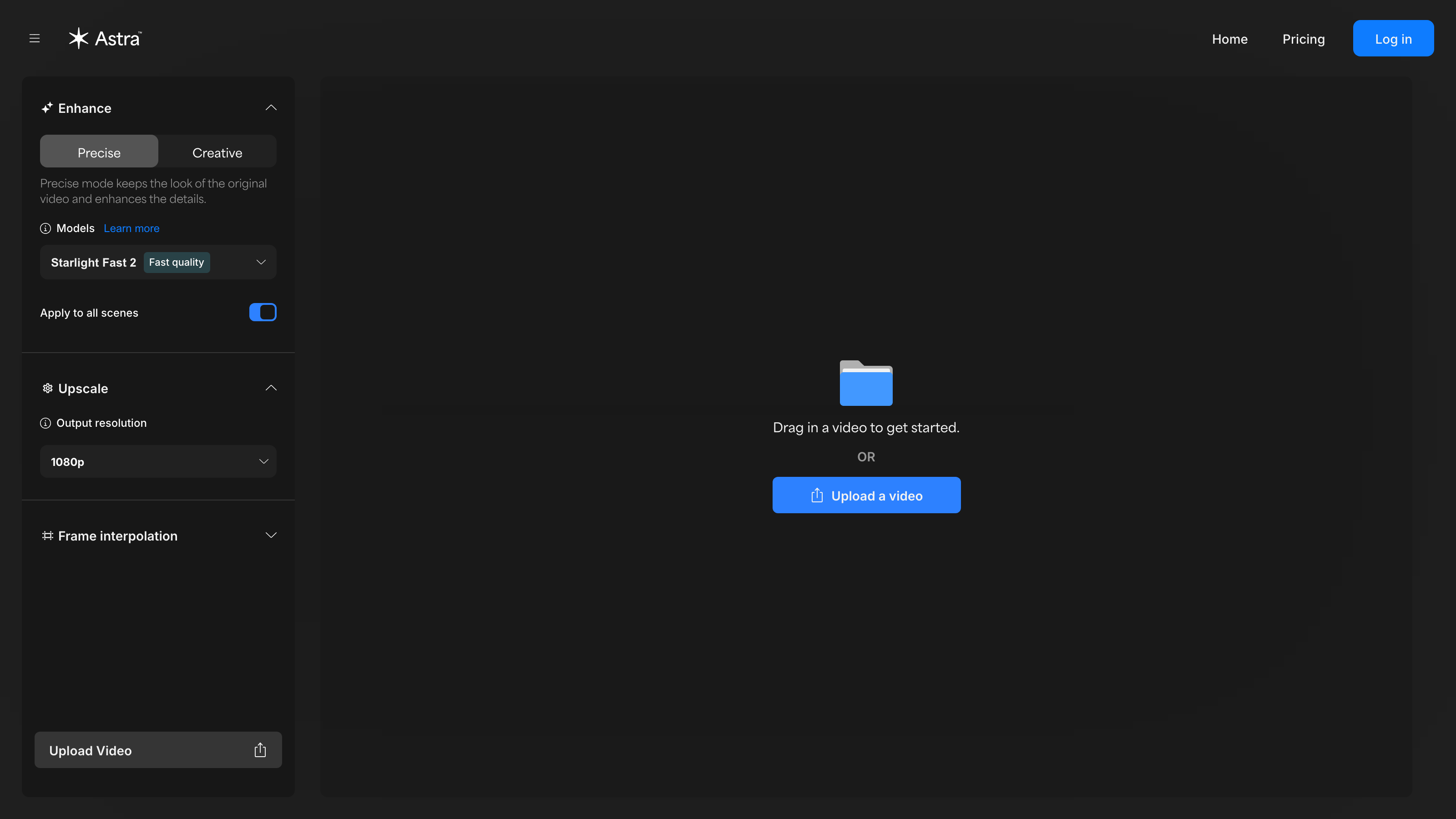
Astra Review: Does This AI Video Enhancer Actually Deliver Studio-Grade Results?
TL;DR
This Astra review covers a browser-based AI video enhancement platform with one specific job: making existing footage look sharper and cleaner through AI Video Upscaling. Astra targets content creators, marketing teams, and agencies who need higher-quality video output without installing software or running expensive local hardware. Pricing is not publicly listed as of July 2026, which is a meaningful barrier for professional buyers who need cost clarity before evaluating any tool.
Overview
Astra, available at astra.app, occupies a narrow but genuinely practical corner of the AI Apps for Videos category. It is not a generative tool. It does not produce video from a text prompt, create synthetic presenters, or animate still images. Its purpose is to take footage you already have and run it through AI models that improve resolution, sharpen detail, and smooth motion.
That focus is worth understanding before you compare Astra to anything else on the market. Most of the current buzz around AI video tools centers on generative features - text-to-video, AI Actors, AI Avatar Generation, and fully synthetic content pipelines. Astra sidesteps that competition entirely and targets a different pain point: post-production enhancement for real-world footage.
The problem is straightforward. Footage shot on smartphones, budget cameras, or older recording equipment rarely meets the quality bar required for broadcast delivery, paid advertising campaigns, or high-quality organic social content. Fixing it the traditional way means skilled editors, licensed software, powerful local rendering hardware, and significant time. Astra's argument is that AI can compress that entire pipeline into a browser-based workflow with no installation required.
This positions Astra squarely in the Editing and Post-Production space for professionals who shoot real footage and need it polished quickly.
Pricing and feature details in this review were verified from the official site in July 2026.
Key Features
AI Video Upscaling
The core function of Astra is AI Video Upscaling. This process uses machine learning models to analyze each frame of a video and reconstruct detail that was lost during capture or compression. The result is higher-resolution output from lower-resolution source material - useful when you need to reformat footage for larger screens, meet delivery specs for broadcast or paid placements, or recover usable quality from archival clips.
AI Video Upscaling is different from simple pixel interpolation, which most editing software has offered for years. Traditional upscaling fills in missing pixels using basic averaging. AI-based upscaling attempts to predict and reconstruct texture detail based on learned visual patterns, which typically produces sharper edges and more convincing fine detail.
For content creators publishing to high-resolution platforms, or for agencies preparing footage for display advertising or video advertising, this capability can make a meaningful difference in the final product - particularly when source footage was captured at 1080p or lower.
Browser-Based Workflow
Astra runs entirely on the web, accessed through astra.app. There is no desktop application to download, no GPU hardware requirement on the user's side, and no plugin installation. The processing happens on Astra's infrastructure.
This is a significant practical advantage for teams without access to high-end workstations. Marketing teams, startups and small business operators, and agencies working across multiple machines can all access the same tool from any browser without managing software licenses or hardware specs.
The tradeoff is dependency on an internet connection and uncertainty about file upload limits and processing queue speeds - points addressed in the cons section below.
Single-Focus Enhancement Pipeline
Unlike broader video editing platforms that bundle timelines, color tools, and effects alongside AI features, Astra is purpose-built for enhancement. The interface is not trying to be a full non-linear editor. Users upload footage, run enhancement, and retrieve the output.
For teams already working in established post-production environments, this kind of focused tool fits cleanly as a step in an existing pipeline rather than replacing it. It handles one task - making footage look better - without requiring a workflow overhaul.
Astra: Pricing
Pricing is not publicly listed on the homepage based on verified data from the official site as of July 2026. Astra does not display a publicly visible pricing page with specific tier names or dollar amounts at the time of this review.
This is a meaningful limitation for buyers evaluating the tool against a budget. The absence of transparent pricing means prospective users need to contact the company or sign up to understand what a subscription or usage-based plan would cost. For marketing teams or agencies that require cost justification before testing a tool, this creates real friction in the evaluation process.
If pricing has been updated since verification, the official site at astra.app is the source to check directly.
Who It's Best For
Content creators repurposing older footage. If you produce YouTube content, short-form video, or documentary-style work, you may have an archive of footage shot at lower resolutions or on older cameras. AI Video Upscaling can help make that material viable for current platforms without reshooting.
Marketing teams preparing video for paid placements. Video advertising on connected TV or large-format digital displays has strict quality requirements. Agencies and in-house marketing teams working with footage that falls short of those specs can use Astra as a finishing step before delivery.
Agencies handling client video assets. Agencies often inherit footage from clients - captured on phones, older cameras, or inconsistent equipment. A browser-based enhancement tool that requires no local installation is practical for teams working across different machines and offices.
Startups and small business operators with limited production budgets. Shooting on a smartphone is often the only option when production budgets are tight. If the footage is solid compositionally but lacks resolution or detail, AI Video Upscaling offers a way to improve it without hiring a post-production specialist.
Not the right fit: users who need generative AI video features. If your goal is to generate video content from a text prompt, produce AI Actors for product explainers, or create synthetic presenters using AI Avatar Generation, Astra is not the right tool. Its scope is strictly enhancement of existing footage. Tools focused on Text-to-Video Generation or AI Avatar Generation serve those needs instead.
Alternatives
If Astra's scope or pricing transparency does not meet your needs, there are a few other tools worth considering in the AI video enhancement and upscaling space.
Topaz Video AI is a desktop application specifically built for AI video upscaling and enhancement. It offers more granular control over enhancement models, supports local processing (which addresses privacy concerns), and has visible pricing. The tradeoff is that it requires capable local hardware and software installation.
Runway is a broader AI video platform that includes enhancement tools alongside generative features like Text-to-Video Generation and AI-Powered Editing. It is a stronger fit for teams that want a wider range of AI video capabilities under one subscription, though it is a more complex tool with a steeper learning curve.
Adobe Premiere Pro with AI enhancement features offers upscaling and enhancement within a full non-linear editing environment. For teams already in the Adobe ecosystem, this may be the lowest-friction path to AI-assisted enhancement, though it carries a higher subscription cost and software complexity.
FAQ
Is Astra a generative AI video tool? No. Astra focuses on AI Video Upscaling for footage you already have. It does not generate video from text prompts or create synthetic presenters. If you need Text-to-Video Generation or AI Avatar Generation, Astra is not designed for those tasks. It is specifically built for improving the quality of real recorded footage during post-production.
Do I need to install any software to use Astra? No installation is required. Astra runs entirely in a web browser through astra.app. There is no desktop application, no plugin, and no GPU hardware requirement on the user's side. Processing happens on Astra's servers, which makes it accessible from any machine with a modern browser and a stable internet connection.
How much does Astra cost? Pricing is not publicly listed on the homepage based on verified data from July 2026. Dollar amounts, tier names, and usage caps are not displayed without signing up or contacting the company. Prospective buyers should visit astra.app directly for current pricing details before making a purchasing decision.
Who is Astra primarily designed for? Astra targets content creators, marketing teams, and agencies who need to improve the visual quality of existing footage quickly. It is particularly relevant for teams without access to high-end post-production hardware or specialists, and for those repurposing archival footage for modern distribution requirements.
Is Astra suitable for large agency workflows? Potentially, yes. The browser-based model removes hardware dependencies, which suits distributed agency teams. However, the lack of public pricing, unknown file size limits, and single-feature scope may require agencies to supplement Astra with other tools for a complete post-production pipeline. Evaluating it against specific use cases before committing is advisable.
Astra: Final Verdict
Astra is a focused, browser-accessible AI video enhancement tool with a clear purpose: improving the quality of footage you already have through AI Video Upscaling. That focus is both its strength and its boundary. For content creators, marketing teams, and agencies dealing with lower-resolution source footage and limited post-production resources, it addresses a real and common problem without requiring software installation or local hardware investment.
The honest caveat is significant. The absence of public pricing creates friction for any buyer who needs cost clarity before evaluating a tool - and that describes most professional buyers. The single-feature scope also means Astra will not replace a broader post-production stack. It fits as one step in a pipeline, not as a complete solution.
This Astra review recommends it as a strong candidate for teams whose specific bottleneck is footage quality rather than footage creation. If your problem is that your existing video does not look good enough for where you want to distribute it, Astra's AI Video Upscaling is worth investigating. If you need generative AI video features, a fuller editing environment, or transparent pricing before you will engage, look at the alternatives first.
Secondary context note: this Astra review focuses on AI video enhancement software. It is unrelated to entertainment titles such as the crimson desert review, happy gilmore 2 reviews, tron ares review, or the spokesman review, which appear in searches alongside AI Apps for Videos tools due to overlapping keyword patterns.
The facts.
Pulled from Astra’s own pages and dated so you can see how current each one is. Anything we could not confirm is left out rather than guessed.
- Platforms
- web checked Oct 2026
Pros & cons.
We don’t publish star ratings we can’t defend. These come from running Astra on live briefs.