
AI Studios
We may earn a commission if you sign up through our link · Affiliate disclosure
Facts verified:
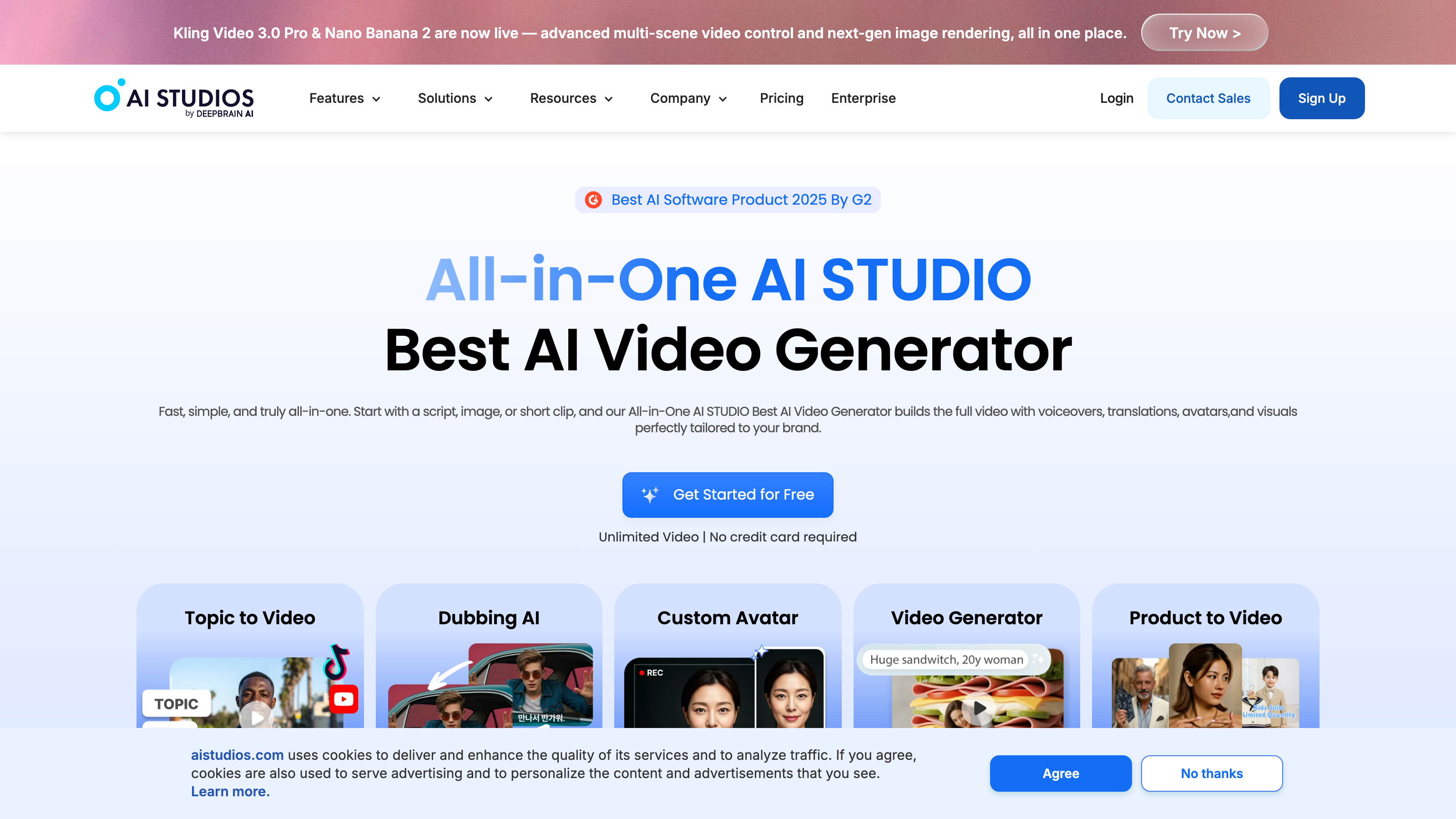
AI Studios Review: A Deep Dive into AI Avatar and Video Creation for Businesses
TL;DR
This AI Studios review covers a web-based platform that converts text and scripts into professional videos using AI avatars, multilingual dubbing, and generative video tools. AI Studios, built by DeepBrain AI, targets marketing teams, educators, and enterprises that need to scale video production without cameras or crews. The freemium model starts at $0/month for solo creators testing the tool, while paid tiers range from $24/month to enterprise contract pricing for large-scale content operations.
Overview
AI Studios, built by DeepBrain AI, is a cloud-based video creation platform that replaces traditional production workflows with AI-generated avatars, voice synthesis, and automated editing. The core problem it solves is straightforward: creating professional video at scale is expensive, slow, and dependent on human talent. AI Studios removes those bottlenecks by letting users paste a script and generate a finished video in minutes.
The platform sits at the intersection of several fast-moving AI categories. It handles AI Avatar Generation, Text-to-Video Generation, AI Dubbing with Lip-Sync, and Voice Cloning - all from a single browser-based interface. That breadth makes it relevant across multiple workflows: a marketing team localizing ads for five regions, an HR department producing onboarding videos, or an e-commerce brand turning product pages into short-form video content.
Unlike point solutions that handle only one task (say, just voice cloning or just video editing), AI Studios positions itself as a full production stack. Users can go from script to publishable video without switching tools.
It publishes directly to or formats output for platforms including YouTube, TikTok, Instagram Reels, LinkedIn, Facebook Ads, Snapchat, Pinterest, and more - covering both organic and paid distribution channels.
Pricing and feature details in this review were verified from the official site in July 2026.
Key Features
AI Video Editor
The AI Video Editor is the central workspace. Users bring in scripts, slides, or media assets and the editor assembles them into a structured video with avatar narration, background scenes, and captions. The interface is web-only, meaning no software download is required. It supports standard output formats and is designed for marketers and educators who want control over visual layout without needing post-production skills.
AI Dubbing with Lip-Sync
This feature translates and re-voices existing video content into other languages while syncing the avatar's mouth movements to the new audio. For teams producing content across multiple markets, this removes the need to reshoot videos for each language. The Proofreading Editor for Translated Scripts lets users review and correct translated dialogue before final export. That review step directly addresses a practical problem with automated translation: errors that pass through undetected and reach the final video.
Voice Cloning
Voice Cloning lets users create a synthetic replica of a specific voice for use across videos. Once cloned, that voice can read any new script without recording new audio. This is useful for brand consistency across a content library, or for creators who want a consistent narrator identity without repeated recording sessions. It falls under the broader AI Voice Generation capability set and is available on paid plans.
Generative Video and Image Models
AI Studios includes Generative AI tools for creating video clips and images from text prompts. The Generative Credits Add-on (custom pricing, available on paid plans) extends this capacity for high-volume users. Publicly available pricing for this add-on is not listed on the vendor site, as verified in July 2026. This feature matters most for marketing teams producing social content at scale, where original visual assets are needed frequently and stock footage is not sufficient.
Product to Video
The Product to Video feature converts product information - such as product descriptions, images, or listing data - into short-form promotional video. This targets e-commerce teams directly, making it relevant to brands publishing on Amazon, Instagram Shopping, Pinterest Shopping, and TikTok. It reduces the manual effort of scripting and shooting product demos by automating that conversion, which is a concrete time saving for brands managing large product catalogs.
Custom LLM Integration
Custom LLM Integration allows enterprise users to connect their own language model to the platform. LLM stands for large language model - the AI systems that power text-generation tools used across industries. This enables businesses to use proprietary data or custom AI behavior in their video scripts, rather than relying solely on AI Studios' built-in tools. It is an enterprise-tier capability suited to organizations with existing AI infrastructure and internal model deployments.
Brand Kit and Custom Templates
Brand Consistency and Style tools are built into the platform through a Brand Kit and Custom Templates feature. Users can lock in colors, logos, fonts, and layout rules so every video produced matches company standards. This is particularly valuable for agencies and marketing teams managing output across multiple creators or departments. Templates and Presets further speed up production by giving teams a starting point that already meets brand requirements, reducing per-video setup time.
Collaboration and Automation Features
Shared Workspaces and Project Collaboration allow teams to work on videos together without emailing files back and forth. SAML SSO - a single sign-on security standard used by enterprise IT teams to manage employee access centrally - means large organizations can integrate AI Studios into their existing identity management systems. Automation and Workflow tools help teams set up repeatable production processes, which is critical for organizations publishing video at high frequency.
AI Studios: Pricing
AI Studios uses a freemium subscription model with four main tiers plus several add-ons.
The Free plan costs $0/month and includes up to 3 AI videos, videos up to 3 minutes long, and 1 Custom Avatar. This tier is useful for initial testing but impractical for any real production volume.
The Personal plan costs $24/month and unlocks unlimited AI videos, videos up to 30 minutes, and 3 Custom Avatars. This is the entry point for solo creators or small businesses with ongoing video needs.
The Team plan costs $55/seat/month. It includes unlimited AI videos, videos up to 60 minutes, and 5 Custom Avatars. The per-seat pricing means costs grow directly with team size - a five-person team pays $275/month before any add-ons - which buyers should factor into budget planning before signing up.
The Enterprise plan is listed as "Contact Us" with no public price. It includes unlimited AI videos, unlimited video duration, and unlimited Custom Avatars - plus access to advanced AI video solutions. Organizations with complex requirements or high output volumes must negotiate pricing directly with the vendor.
Four add-ons are available on paid plans, all at custom pricing not publicly listed on the site as of July 2026: Custom Avatars Add-on, Interactive Avatars Add-on, AI Dubbing Usage Add-on, and Generative Credits Add-on. The absence of published pricing for these add-ons makes it difficult to estimate total costs for teams that need extended functionality, and a detailed quote from the vendor is necessary before committing.
Who It's Best For
Marketing Teams Teams running paid campaigns across YouTube Ads, TikTok Ads, Instagram Ads, LinkedIn Ads, and Snapchat Ads can use AI Studios to produce creative variations quickly. The Brand Kit ensures consistency across those variants, and the dubbing tools support localization without reshoots. This is the strongest use case for the platform, given how directly the feature set maps to multi-channel, multi-market production needs.
Educators and Corporate Training Teams AI-Generated Training Materials and corporate communications represent a major use case. HR teams producing onboarding videos, compliance training, or internal announcements can replace costly video shoots with avatar-narrated content. Auto Captions and SRT Upload/Download support accessibility requirements, which matter for organizations with legal compliance obligations.
E-Commerce Brands The Product to Video feature and the platform's compatibility with Amazon Listings, Pinterest Shopping, and TikTok Posts make it relevant for brands that need short product videos at high volume. This fits businesses with large SKU catalogs where filming each product individually is not feasible within a normal content budget.
Agencies Agencies producing video content for multiple clients benefit from Custom Templates, shared workspaces, and separate brand kits per client. The Custom LLM Integration also opens the door for agencies with advanced AI workflows or clients with proprietary data requirements.
Content Creators Scaling Output Individual creators on the Personal plan at $24/month can produce unlimited videos with consistent AI narration. That supports regular publishing schedules on YouTube, Instagram Reels, or LinkedIn without constant recording sessions or reliance on external voiceover talent.
Not the Right Fit: Filmmakers and High-End Video Producers AI Studios is not designed for narrative filmmaking, documentary work, or any project requiring cinematic quality, physical camera work, or nuanced human performance. Video editors who need raw footage, multi-camera setups, or manual color grading will find the platform too constrained for that work. Tools like Adobe Premiere Pro or DaVinci Resolve remain the appropriate choice for those workflows.
Alternatives
Synthesia Synthesia is the most direct competitor. It also offers AI avatar videos, multilingual dubbing, and a template library, and is widely cited for corporate training and enterprise use with a polished avatar selection. Buyers should compare avatar quality and language coverage between Synthesia and AI Studios directly, as both update their model rosters frequently enough that third-party comparisons date quickly.
HeyGen HeyGen focuses heavily on AI avatar video and video translation with lip-sync, similar to AI Studios. It has gained traction with marketing teams and content creators. HeyGen's interface is regarded as approachable for beginners, and its translation features are competitive with AI Studios' AI Dubbing with Lip-Sync offering. Buyers choosing between the two should test translation accuracy on their specific target languages.
Runway Runway targets a different segment - video editors and creative professionals who need generative video tools integrated into a more traditional editing workflow. If Generative AI for cinematic or artistic output is the priority rather than avatar-based narration, Runway is a more relevant option than AI Studios.
FAQ
Does AI Studios require any video editing experience? No. The platform is designed for users without production backgrounds. Scripts, slides, or text prompts are the primary inputs. The AI Video Editor handles layout, avatar animation, and audio automatically. Users familiar with presentation software will find the workflow reasonably intuitive, though more advanced features like Custom LLM Integration require technical knowledge to configure.
Can I use AI Studios videos for commercial purposes? The free plan's commercial use rights are not explicitly detailed in the verified product data as of July 2026. Buyers with commercial publishing needs - such as paid advertising on YouTube Ads or TikTok Ads - should confirm commercial licensing terms directly with AI Studios before publishing, particularly on the free tier where restrictions are most likely.
How does the AI Dubbing with Lip-Sync feature work? You upload an existing video, select a target language, and the platform generates a translated audio track. It then syncs the avatar's lip movements to the new audio. The Proofreading Editor for Translated Scripts lets you review and edit the translated dialogue before export, reducing errors that automated translation tools often introduce without a review step.
Is there an API for integrating AI Studios into other tools? API access is not mentioned in the verified feature data as of July 2026. Buyers who need to integrate AI Studios into existing content pipelines or Automation and Workflow systems should contact the vendor directly to ask about API availability, particularly at the Enterprise tier where such integrations are most commonly needed.
What is the difference between a Custom Avatar and an Interactive Avatar? A Custom Avatar is a digital likeness trained on your video footage or provided assets, used for scripted video narration. An Interactive Avatar (available as an add-on at custom pricing) appears to support real-time or conversational interactions - more aligned with customer-facing chatbot or support scenarios than scripted video production. Exact specifications for Interactive Avatars should be confirmed with the vendor before purchasing the add-on.
AI Studios: Final Verdict
AI Studios is a capable, broad-scope platform for organizations that need to produce video at scale without building a production team. Its combination of AI Avatar Generation, AI Dubbing with Lip-Sync, Voice Cloning, and Generative AI tools makes it one of the more complete solutions in its category. The Brand Consistency and Style features, Collaboration and Sharing tools, and enterprise security options (SAML SSO, Custom LLM Integration) mean it can grow with an organization rather than hitting a capability ceiling quickly.
The ideal buyer is a marketing team, corporate training department, or agency that produces recurring video content across multiple channels or languages, and wants to bring that production in-house at lower cost than traditional video shoots.
The main caveat is cost transparency. Add-on pricing is entirely absent from the public site as of July 2026, and the Team plan's $55/seat/month structure becomes expensive for growing teams before add-ons are factored in. Any buyer beyond the Personal tier should request a detailed quote that includes projected add-on usage before committing to a contract. Overall, this AI Studios review finds the platform well-suited to its target audience, with pricing transparency as the most significant area where the vendor could improve the buying experience.
The facts.
Pulled from AI Studios’s own pages and dated so you can see how current each one is. Anything we could not confirm is left out rather than guessed.
- Free tier
- Yes checked Oct 2026
- Starting price / month
- $24/mo checked Oct 2026
- Cheapest paid tier
- $24/mo checked Oct 2026
- Pricing model
- Per seat checked Oct 2026
- Platforms
- web checked Oct 2026
- Enterprise plan
- Yes checked Oct 2026
AI Studios pricing.
Pricing extracted from AI Studios's site. Confirm before buying.
Pros & cons.
We don’t publish star ratings we can’t defend. These come from running AI Studios on live briefs.
AI-generated analysis; edited and accountable: Tom Young. Data is verified from vendor sites on a dated schedule, not hands-on trials.
- Verified
- July 2026
- Pipeline
- 2026.07.04-1
- Checks run (2)
- author, quality_review
- SEO score
- 62
- Evidence sources (1)
- aistudios.com